Ship in a Flash.
From Anywhere.

Prompt engineer or vibe code with your agents side by side, from your office or your phone at the beach.

From $15/moUse your own AI subscriptions or API keysTry Pro free for 7 days

One Window, 3 Pane Types

Open each pane as a harness, a standalone chat, or a terminal—all in one window.

Up to 8 workspaces. Up to 8 panes per workspace.

Harness pane

Open a project and put AI agents to work using your own API keys, local models, or your own models.

Work with sandboxed execution and dedicated Plan, Blueprint, and Goal modes. Develop locally or connect over Remote SSH, with Skills, MCP integrations, web search and fetch, and memory to help you ship production-grade software.

Chat pane

Start a standard AI conversation without opening or selecting a project. Brainstorm ideas, explore questions, and think through possibilities independently of your project work.

Terminal pane

Access a full system terminal without leaving the QikDeck window. Run commands, development tools, and other terminal-based AI harnesses alongside QikDeck for maximum flexibility.

If it can run in a terminal, it can run in QikDeck.

Local or Remote Development

Work on local projects or connect harness panes directly to remote machines with native SSH. Keep your development workflow in one window and get more done without switching apps.

Plan it, Build it, Ship it.

Plan mode

Explore your codebase and review a read-only plan before any changes are made.

Blueprint mode

Choose an Architect model to plan and an Engineer model to build, with an optional Architect review of the result.

Goal mode

Set an objective and let QikDeck keep working toward it across multiple turns, with progress in view and controls to pause or resume.

Your models. One consistent workflow.

Choose how you access AI

Bring your own API keys, or connect local and self-hosted model servers. Built-in provider profiles make setup straightforward, with supported ChatGPT connections available too.

Use the providers you know—or connect any OpenAI-compatible or Anthropic-compatible API.

Built-in provider profiles

QikLMQwenDeepSeekMiniMaxGeminiZ.aiKimi
OpenAI-compatible APIAnthropic-compatible API

Local AI, first-class support. A dedicated QikLM profile brings models running on your own hardware into the same workflow. Meet QikLM

Included with Pro

Speak It, Not Type It

Use QikVoice to quickly dictate your prompts.

Simply press and hold F8 on your keyboard to activate QikVoice and release when finished speaking.

Capable agents. Clear control.

Agents work in a sandbox environment until you grant the level of access each task needs.

Choose the level of autonomy

Ask First

Approval-led execution for cautious, controlled work.

Workspace Auto

Routine project work with safeguards for sensitive actions.

Plan Mode

Read-only investigation and planning before any change.

Full Access

Explicitly broader execution permissions when trusted.

Handle approvals and agent questions directly in the app. Stop a task when needed.

Meet QikLM · Free

Your models.
Your hardware.

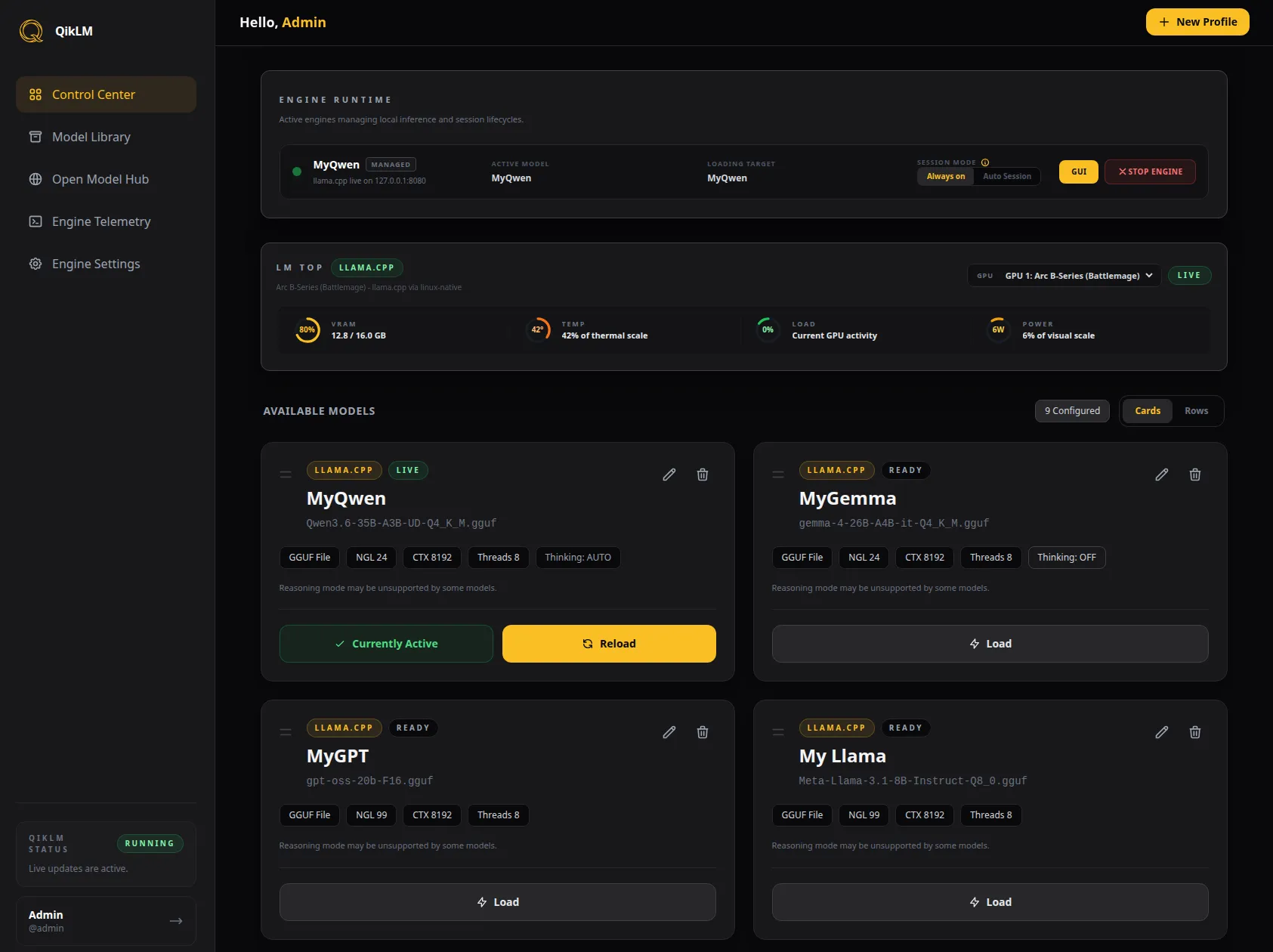
QikLM is QikDeck's free companion for local AI: a lightweight router that runs llama.cpp and vLLM on your own machine. Connect it with the built-in QikLM profile and your local models work like any other provider.

  • One binary, zero dependencies

    No Docker, Electron, or Python. Boots in seconds.

  • Models that manage themselves

    Save engine flags in profiles. QikLM loads, swaps, and frees VRAM for you.

  • Chat and GPU stats in your browser

    PromptUI and live lmtop gauges, from any device on your network.

  • Works with your other tools

    Also powers Claude Code, Codex, OpenCode, and any OpenAI-compatible client.

Get QikLM free

Free for personal and work use. Linux, macOS, and Windows.

The QikLM Control Center with a running llama.cpp engine, live GPU gauges, and saved model profiles.

Bring your next project to the deck.

Plan it. Build it. Review it. Keep the work in view.